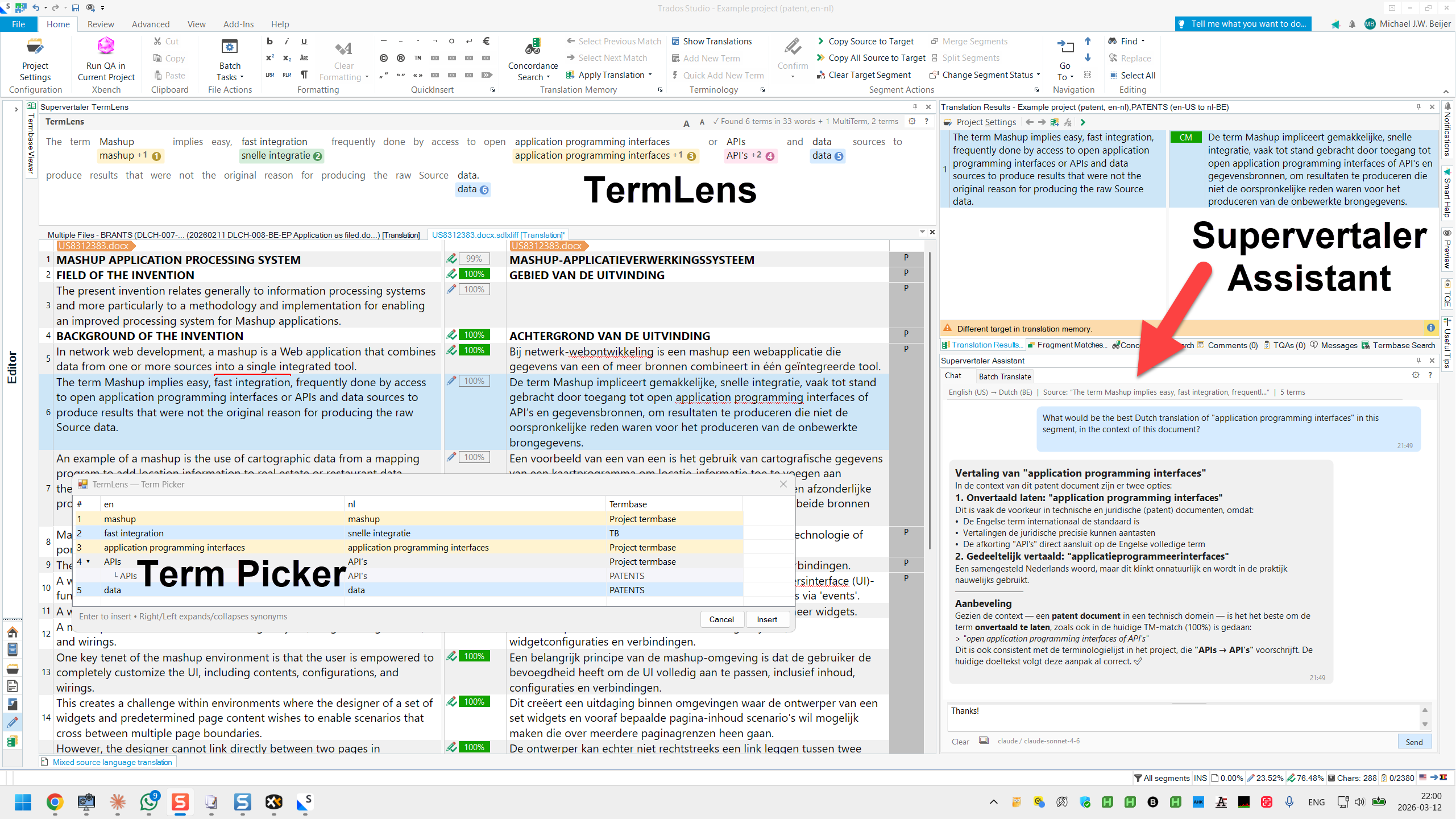
# Supervertaler Assistant
{% hint style="info" %}
You are viewing help for **Supervertaler for Trados** -- the Trados Studio plugin. Looking for help with the standalone app? Visit [Supervertaler Workbench help](https://help.supervertaler.com).
{% endhint %}
The Supervertaler Assistant is a conversational chat panel that runs inside Trados Studio as a separate dockable panel. It is context-aware: it automatically includes your current source and target text, matched terminology, and TM matches in every request, so the AI can give you informed answers about the segment you are working on.
## Opening the Panel
The Supervertaler Assistant lives in its own dockable panel. To open it, go to **View > Supervertaler Assistant**.
You can dock the panel on the right side, bottom, or as a floating window. Trados remembers the panel position between sessions.
## Chat
Type a message in the input field at the bottom and press **Enter** to send. The AI will consider your current source text, target text, matched terminology from your termbases, and TM fuzzy matches when responding.
| Action | How |
| --------------------------- | ------------------------- |
| Send a message | Press **Enter** |
| Insert a line break | Press **Shift+Enter** |
| Stop a response in progress | Click the **Stop** button |
### What You Can Ask
Because the assistant has access to your current segment context, you can ask things like:
* "Translate this segment"
* "What is the difference between these two translations?"
* "Is this terminology correct in a legal context?"
* "Suggest a more formal alternative"
* "Explain this source text"
### Chat History
The conversation is saved automatically after every message and restored the next time Trados starts. Your history persists until you explicitly clear it.
To clear the history, click the **Clear** button in the chat toolbar.
{% hint style="info" %}
Chat history is stored in `~/Supervertaler/trados/chat_history.json`. It is a single global history -- not per project or per file.
{% endhint %}
### Right-Click Menu
Right-click any assistant response bubble to access:
| Action | Description |
| ----------------------- | ------------------------------------------------------------------------------------------------------------------------------------------------------------------------------------------------------------------------------------------------------------------------ |
| **Copy** | Copies the raw Markdown to the clipboard, preserving tables and formatting |
| **Apply to target** | Inserts the plain text (Markdown stripped) into the active target segment |
| **Save as Prompt...** | Saves the response as a reusable prompt template |
| **Save to memory bank** | Saves the question + response as an inbox note in the active memory bank so useful answers are not lost. Run [Process Inbox](https://supervertaler.gitbook.io/trados/features/ai-assistant/super-memory/process-inbox) afterwards to compile it into the knowledge base. |
If you select text within a bubble before right-clicking, **Copy** and **Apply to target** operate on the selection only.
## Features
| Feature | Description |
| -------------------------------------------------------------------------------------------------------- | ----------------------------------------------------------------------------------------------------- |
| [**Context Awareness**](https://supervertaler.gitbook.io/trados/features/ai-assistant/context-awareness) | Automatic project, segment, terminology, TM, and document context in every request |
| [**File Attachments**](https://supervertaler.gitbook.io/trados/features/ai-assistant/file-attachments) | Attach images and documents (PDF, DOCX, XLSX, TMX, etc.) for additional context |
| [**Studio Tools**](https://supervertaler.gitbook.io/trados/features/ai-assistant/studio-tools) | Query your Trados Studio projects, TMs, termbases, and statistics using natural language |
| [**Incognito Mode**](https://supervertaler.gitbook.io/trados/features/ai-assistant/incognito-mode) | Anonymise project names, file paths, and personal data in AI responses for safe sharing |
| [**Providers and Models**](https://supervertaler.gitbook.io/trados/features/ai-assistant/providers) | Supports 7 AI providers including OpenAI, Claude, Gemini, Grok, Mistral, Ollama, and custom endpoints |
## See Also
* [QuickLauncher](https://supervertaler.gitbook.io/trados/features/quicklauncher) -- One-click prompt shortcuts
* [Batch Translate](https://supervertaler.gitbook.io/trados/features/batch-operations/batch-translate) -- Translate multiple segments at once
* [AI Settings](https://supervertaler.gitbook.io/trados/settings/ai-settings) -- API keys, model selection, context options
* [Keyboard Shortcuts](https://supervertaler.gitbook.io/trados/reference/keyboard-shortcuts)
---
# Agent Instructions: Querying This Documentation
If you need additional information that is not directly available in this page, you can query the documentation dynamically by asking a question.
Perform an HTTP GET request on the current page URL with the `ask` query parameter:
```
GET https://supervertaler.gitbook.io/trados/features/ai-assistant.md?ask=
```
The question should be specific, self-contained, and written in natural language.
The response will contain a direct answer to the question and relevant excerpts and sources from the documentation.
Use this mechanism when the answer is not explicitly present in the current page, you need clarification or additional context, or you want to retrieve related documentation sections.